Tuesday, February 10, 2026
Submit Press Release
Got Action
No Result
View All Result
  • Home
  • Football
  • Basketball
  • NCAA
    • NCAA Football
    • NCAA Basketball
    • NCAA Baseball
    • NCAA Sport
  • Baseball
  • NFL
  • NBA
  • NHL
  • MLB
  • Formula 1
  • MMA
  • Boxing
  • Tennis
  • Golf
  • Sports Picks
  • Home
  • Football
  • Basketball
  • NCAA
    • NCAA Football
    • NCAA Basketball
    • NCAA Baseball
    • NCAA Sport
  • Baseball
  • NFL
  • NBA
  • NHL
  • MLB
  • Formula 1
  • MMA
  • Boxing
  • Tennis
  • Golf
  • Sports Picks
Got Action
No Result
View All Result

Build an Environment for Sports Data Analysis

February 8, 2025
in NCAA Sport
0 0
0
Home NCAA Sport
Share on FacebookShare on Twitter


If you follow this blog, chances are that you’ve seen and perhaps even walked through my guide on building an environment for analysis. That article is from 5 years ago and I still get questions and feedback on it to this day. To be clear, I still think it’s a perfectly valid way to build an environment and to this day I still primarily use the Docker setup outlined in the guide. However, I find myself starting to gravitate more and more towards a non-Docker environment.

Docker is great and I still use it for many things, but lately I’ve found that it eats up a lot of resources on my local machine so I don’t always have it running. The base Docker image I shared in the previous article is still published and available for anyone to use, but it has been increasingly challenging to maintain and keep up-to-date via automation. You can still use that image and it still works great in my experience, but recently gained appreciation for a more lightweight approach.

These are the tools used in this approach:

VS Code
Jupyter
Python (with virtual environments)
The CFBD and CBBD Python packages

If you’ve never used VS Code before as an IDE, you should be checking it out. It’s long been my IDE of choice for everything else and it provides a fantastic experience for working with Jupyter notebooks. What has put it over the top for me and caused my to use it more and more for data analytics task is GitHub Copilot. GitHub Copilot has become something that I am no longer able to live without. You may be familiar with my recent rewrite of the CFBD API, website, and most associated infrastructure. You may also be familiar with my recent foray into basketball with CollegeBasketballData.com. I wouldn’t have been able to do any of this without Copilot. It’s probably at least halved my development time on the above. And it works seamlessly with Jupyter notebooks in VS Code.

Just as with the previous guide, this guide should work whether you are on Windows, Mac, or Linux. I am a Windows user and still highly recommend setting up Windows Subsystem for Linux (WSL) with your favorite Linux flavor (I use Ubuntu) if you are also in Windows. I do all my development (personal and professional) exclusively in WSL.

Prerequisites are that you have the following installed:

You will also need some VS Code extensions, at the very least the Python and Jupyter extensions. Here is the list of extensions I am running for this tutorial:

Open up a terminal window. Let’s create a directory called jupyter and move into that directory.

mkdir jupyter
cd jupyter

Next, we’re going to create a Python virtual environment. This is always a good practice as allows you to work with different Python versions and package versions across different folders/repos.

python -m venv ./venv

This should have created a venv folder with the Python binaries and some scripts. We are going to activate the virtual environment we just created by running:

source ./venv/bin/activate

Note that this command may differ for Mac and non-WSL Windows. Refer to the documentation linked above for instructions specific to those OSes.

Next we will install a list of commonly used Python packages. Feel free to add any others you may need. We will also write these packages into a requirements.txt file for easy installation.

pip install cbbd cfbd ipykernel matplotlib numpy pandas scikit-learn xgboost
pip freeze > requirements.txt

Let’s create an empty Jupyter notebook and open this directory in VS Code.

touch test.ipynb
code .

Inside VS Code, open the test.ipynb file from the left sidebar. Then, click on “Select Kernel” in the top-right and then “Python Environments…” from the dropdown list that appears.

Select the environment labeled venv. There should be a star next to it.
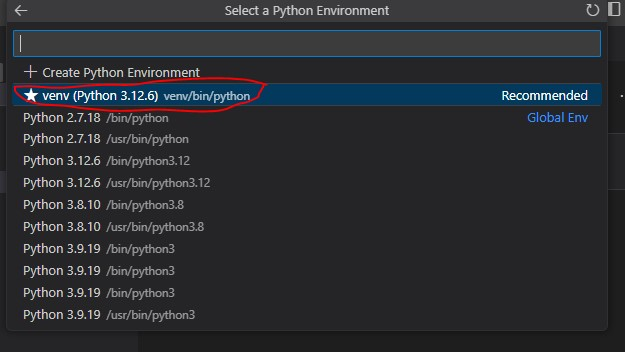
Now we can begin working in the Jupyter notebook. Let’s start by importing the cfbd and pandas packages and running the code block.

import cfbd
import pandas as pd

If you didn’t install the ipykernel package with the list of packages above, you may be greeted with the below prompt. Just click ‘Install’ and wait.
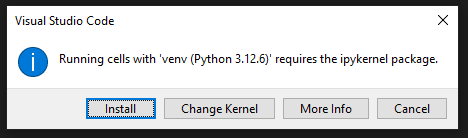
Next, let’s configure the CFBD package with our CFBD API key. If you do not have a key, you can acquire one from the website. Replace the text below with your personal key.

configuration = cfbd.Configuration(
access_token = ‘your_key_here’
)

We can now call the API to grab a list of games:

with cfbd.ApiClient(configuration) as api_client:
games_api = cfbd.GamesApi(api_client)

games = games_api.get_games(year=2024, classification=’fbs’)

len(games)

In my example, there were 920 games returned. It’s pretty easy to load those into a Pandas DataFrame.

df = pd.DataFrame.from_records([g.to_dict() for g in games])
df.head()
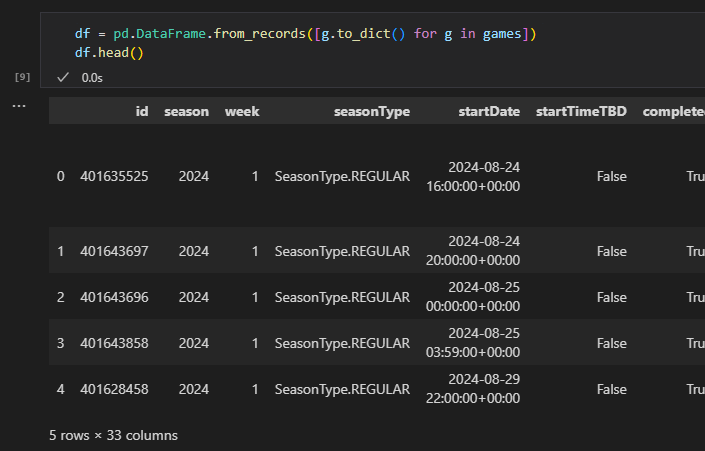
One neat trick using the Python library is that every method has a special version that will also include the HTTP response metadata. Simply attach _with_http_info to the end of the method. You can use this to keep track of how many monthly calls you have remaining.

with cfbd.ApiClient(configuration) as api_client:
games_api = cfbd.GamesApi(api_client)

response = games_api.get_games_with_http_info(year=2024, classification=’fbs’)

response.headers[‘X-CallLimit-Remaining’]
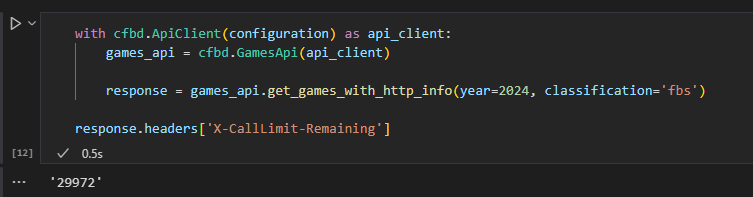
And then access the same as before data via the response.data field.

games = response.data
df = pd.DataFrame.from_records([g.to_dict() for g in games])
df.head()
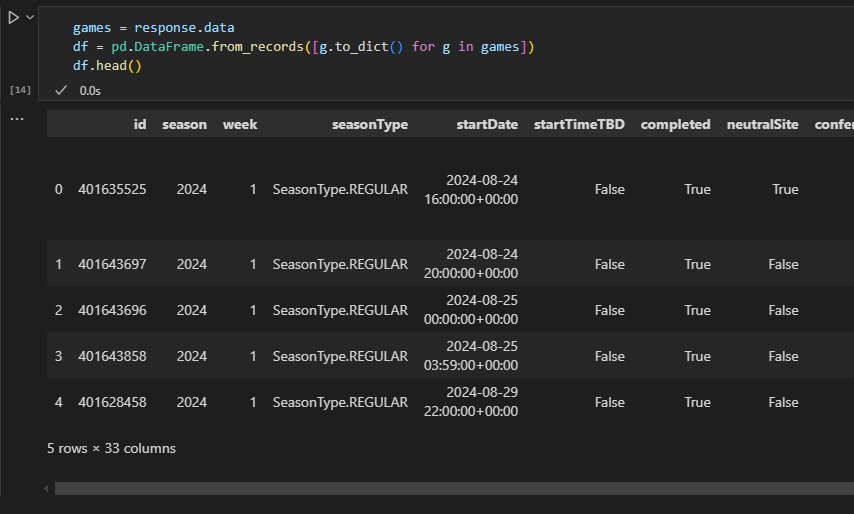
And that is all there is to it!

I do still love Docker for many things and think it is still perfectly adequate to use for a data analytics environment. However, you can see how this approach is much more lightweight and allows you to leverage the full capabilities of VS Code. We didn’t really dig into the GitHub Copilot extension. If you didn’t install, then I cannot recommend it enough as it is a gamechanger.

Some other tweaks that people make include swapping out pip for conda. However, I have found the above setup to be more than adequate. Anyway, happy coding!


Source link

Tags: AnalysisBuildDataEnvironmentSports
Previous Post

Interdonato looking for improvement in Year 2 at BC

Next Post

UFC 312 Recap: Knockouts, Submissions, and Dominating Decisions

Related Posts

History shows Kyle Whittingham has a great shot at beating Ohio State in 2026
NCAA Sport

History shows Kyle Whittingham has a great shot at beating Ohio State in 2026

February 10, 2026
Ole Miss has new evidence in Trinidad Chambliss eligibility case
NCAA Sport

Ole Miss has new evidence in Trinidad Chambliss eligibility case

February 10, 2026
Rebels file reconsideration for Trinidad Chambliss eligibility
NCAA Sport

Rebels file reconsideration for Trinidad Chambliss eligibility

February 10, 2026
Kansas State Basketball Assistant Mark Vital Arrested
NCAA Sport

Kansas State Basketball Assistant Mark Vital Arrested

February 9, 2026
2026 NFL Mock Draft: After Super Bowl LX, how might first three rounds look?
NCAA Sport

2026 NFL Mock Draft: After Super Bowl LX, how might first three rounds look?

February 9, 2026
Former UNC football QB-turned-linebacker wins Super Bowl 60
NCAA Sport

Former UNC football QB-turned-linebacker wins Super Bowl 60

February 9, 2026
Next Post
UFC 312 Recap: Knockouts, Submissions, and Dominating Decisions

UFC 312 Recap: Knockouts, Submissions, and Dominating Decisions

Super Bowl 59 prop bet mega-post! – Cole’s Gameday Blog

Super Bowl 59 prop bet mega-post! – Cole's Gameday Blog

Leave a Reply

Your email address will not be published. Required fields are marked *

  • Trending
  • Comments
  • Latest
United States set to host 2031 FIFA Women’s World Cup, co-hosting with ‘Concacaf partners’ – Equalizer Soccer

United States set to host 2031 FIFA Women’s World Cup, co-hosting with ‘Concacaf partners’ – Equalizer Soccer

April 4, 2025
Man City Keep UCL Journey Alive, Liverpool Suffered First Loss | Football news at 1000Goals.com: Football Betting, Highlights, and More

Man City Keep UCL Journey Alive, Liverpool Suffered First Loss | Football news at 1000Goals.com: Football Betting, Highlights, and More

January 30, 2025
Popyrin ready for Tommy Paul test at Roland Garros | 1 June, 2025 | All News | News and Features | News and Events

Popyrin ready for Tommy Paul test at Roland Garros | 1 June, 2025 | All News | News and Features | News and Events

June 1, 2025
The Mock Draft project: 2025’s most wanted fantasy football picks

The Mock Draft project: 2025’s most wanted fantasy football picks

July 1, 2025
Las Vegas Predicts College Football's 9 Best Teams In 2025

Las Vegas Predicts College Football's 9 Best Teams In 2025

April 3, 2025
How Kupp and Adams have made Puka a better receiver

How Kupp and Adams have made Puka a better receiver

January 24, 2026
Anthony Davis could return to Mavericks’ lineup during upcoming Eastern road trip: Report

Anthony Davis could return to Mavericks’ lineup during upcoming Eastern road trip: Report

1879
Avious Griffin Highlights Boxing Insider Promotion’s Card By Stopping Jose Luis Sanchez In 9.

Avious Griffin Highlights Boxing Insider Promotion’s Card By Stopping Jose Luis Sanchez In 9.

821
What to expect from 49ers QB Brock Purdy after massive raise

What to expect from 49ers QB Brock Purdy after massive raise

8
Staff Picks: Week Zero matchups! College football is here

Staff Picks: Week Zero matchups! College football is here

5
Clemson quarterback explains his loyalty to Clemson football

Clemson quarterback explains his loyalty to Clemson football

5
Canelo-Crawford Gets A Star Analyst: Andre Ward Steps Out Of The Shadows For Netflix’s Historic Boxing Event

Canelo-Crawford Gets A Star Analyst: Andre Ward Steps Out Of The Shadows For Netflix’s Historic Boxing Event

2
Bitesize Prediction: Rochdale vs Forest Green – 11/02/26

Bitesize Prediction: Rochdale vs Forest Green – 11/02/26

February 10, 2026
History shows Kyle Whittingham has a great shot at beating Ohio State in 2026

History shows Kyle Whittingham has a great shot at beating Ohio State in 2026

February 10, 2026
North Carolina vs. Miami prediction, odds, time: 2026 college basketball picks from proven model

North Carolina vs. Miami prediction, odds, time: 2026 college basketball picks from proven model

February 10, 2026
Michael Morales Tells Ian Machado Garry To “Suck It,” Says UFC Welterweight Title Is His

Michael Morales Tells Ian Machado Garry To “Suck It,” Says UFC Welterweight Title Is His

February 10, 2026
Nebraska expected to add Tyler Yelk to staff as safeties coach

Nebraska expected to add Tyler Yelk to staff as safeties coach

February 10, 2026
What Todd Monken’s arrival means for Shedeur Sanders, Browns QBs

What Todd Monken’s arrival means for Shedeur Sanders, Browns QBs

February 10, 2026
Facebook Twitter Instagram LinkedIn TikTok Pinterest
Got Action

Stay updated with the latest sports news, highlights, and expert analysis at Got Action. From football to basketball, we cover all your favorite sports. Get your daily dose of action now!

CATEGORIES

  • Baseball
  • Basketball
  • Boxing
  • Football
  • Formula 1
  • Golf
  • MLB
  • MMA
  • NBA
  • NCAA Baseball
  • NCAA Basketball
  • NCAA Football
  • NCAA Sport
  • NFL
  • NHL
  • Tennis
  • Uncategorized

SITEMAP

  • About us
  • Advertise with us
  • Submit Press Release
  • Disclaimer
  • Privacy Policy
  • DMCA
  • Cookie Privacy Policy
  • Terms and Conditions
  • Contact us

Copyright © 2025 Got Action.
Got Action is not responsible for the content of external sites.

Welcome Back!

Login to your account below

Forgotten Password?

Retrieve your password

Please enter your username or email address to reset your password.

Log In
No Result
View All Result
  • Home
  • Football
  • Basketball
  • NCAA
    • NCAA Football
    • NCAA Basketball
    • NCAA Baseball
    • NCAA Sport
  • Baseball
  • NFL
  • NBA
  • NHL
  • MLB
  • Formula 1
  • MMA
  • Boxing
  • Tennis
  • Golf
  • Sports Picks
Submit Press Release

Copyright © 2025 Got Action.
Got Action is not responsible for the content of external sites.